
Over the past decade, I’ve watched countless businesses scramble to keep up with the data deluge. From a regional hospital chain trying to predict patient admissions, to a boutique e‑commerce store hunting for ways to personalize product recommendations, the common thread was always the same. They needed AI, but they lacked the infrastructure to run it.
That’s where AI cloud software stepped in, and today, it’s not just an option; it’s the backbone of modern innovation. Having deployed dozens of AI‑driven cloud solutions across industries, I’m excited to break down what AI cloud software really is, why it matters, how it’s used, and what you should watch out for.
What Exactly Is AI Cloud Software?
At its core, AI cloud software refers to a suite of artificial‑intelligence tools, platforms, and services delivered over the internet (the cloud) rather than installed on local servers. It lets developers, data scientists, and even non‑technical business users build, train, deploy, and manage machine‑learning (ML) models without owning or maintaining physical hardware.
Think of it as the difference between owning a car and using a ride‑share service. With traditional AI, you’d need to purchase high‑powered GPUs, set up data centers, manage cooling, and hire specialized IT staff. With AI cloud software, you simply “rent” the computing power, storage, and pre‑built AI capabilities you need, paying only for what you use.
Major players like Amazon Web Services (AWS) SageMaker, Microsoft Azure Machine Learning, Google Cloud Vertex AI, and IBM Watson Studio dominate this space, but niche platforms (e.g., DataRobot, H2O.ai) also offer specialized cloud‑based AI tools.
Why the Cloud? The Evolution of AI Deployment:
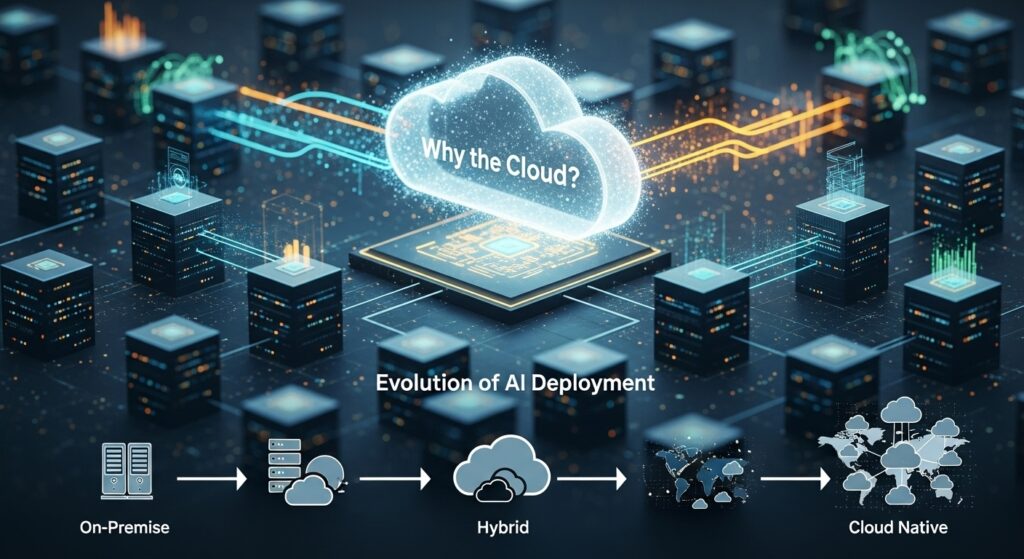
Back in 2015, deploying an AI model could take months. Teams had to provision servers, install libraries, wrestle with data pipelines, and hope their GPU didn’t overheat. Today, thanks to AI cloud software, the same task can be accomplished in hours, sometimes minutes.
Three game‑changing shifts drove this evolution:
- Scalability on Demand
AI models, especially deep‑learning ones, hunger for computing power. Training a computer‑vision model on millions of images can chew through terabytes of data and require hundreds of GPUs. Cloud platforms let you spin up exactly the resources you need, scale them up during training, then scale them back down to zero when the model is live. No more idle servers racking up electricity bills.
Real‑world example: A logistics company I worked with needed to predict delivery delays using real‑time traffic data. During rush hour, their model required massive processing. With AWS SageMaker, they auto‑scaled compute resources between 5 p.m. and 8 p.m., then scaled down overnight. Their compute costs dropped by 42% compared to their old on‑premise setup.
- Managed Services & Pre‑Built AI
Cloud providers now offer AI‑as‑a‑Service (AIaaS). You don’t need to code a facial‑recognition algorithm from scratch. Instead, you call an API like Amazon Rekognition or Google Vision API and get results in seconds. This democratizes AI so that marketers, product managers, and even small‑business owners can embed AI into their workflows. - Collaboration & Accessibility
Cloud notebooks (like Jupyter on AWS SageMaker or Google Colab) let teams collaborate in real time, regardless of location. Version control, shared datasets, and instant deployment pipelines turn AI development from a siloed, slow process into an agile, team sport.
Real‑World Applications: Where AI Cloud Software Shines

1. Healthcare – Diagnostic Assistance
A regional hospital network used Azure Machine Learning to build a model that analyzes chest X‑rays. Radiologists upload an image via a simple web portal; the cloud‑based AI flags potential anomalies (e.g., early‑stage pneumonia) within seconds. The model continuously improves as new labeled data flows in, all handled in the cloud. Result? Radiologists report a 30% reduction in diagnostic oversight for subtle cases.
2. Retail – Hyper‑Personalization
An online fashion retailer leveraged Google Vertex AI to power its recommendation engine. By analyzing browsing behavior, purchase history, and even how long a user hovers over an image, the AI suggests products with uncanny accuracy. Since deploying the cloud solution, their conversion rate rose from 2.1% to 3.8%, a massive lift in a competitive market.
3. Finance – Real‑Time Fraud Detection
A mid‑size bank implemented AWS Fraud Detector (a managed AI service) to monitor transactions. The cloud model evaluates each transaction against thousands of historical patterns in milliseconds. When suspicious activity spikes (e.g., a sudden overseas purchase), the system flags it instantly. Fraud losses dropped by 27% in the first quarter after launch.
4. Manufacturing – Predictive Maintenance
An automotive parts factory installed IoT sensors on assembly‑line machines. Data streams into IBM Maximo on the cloud, where an AI model predicts when a motor is likely to fail. Maintenance teams receive alerts before a breakdown occurs, slashing downtime by 22% and saving hundreds of thousands in unplanned repairs.
Benefits of AI Cloud Software
| Anyone with an internet connection can use it; no specialized hardware is needed. | Why It Matters |
|---|---|
| Cost Efficiency | Pay‑as‑you‑go model eliminates upfront hardware costs. No more “sunk cost” servers. |
| Speed to Market | Deploy a model in hours, not months. Faster experimentation = faster ROI. |
| Scalability | Instantly handle spikes in data or user demand. |
| Accessibility | Anyone with an internet connection can use it no specialized hardware needed. |
| Built‑in Best Practices | Cloud providers embed security, compliance (GDPR, HIPAA), and MLOps tools, reducing risk. |
| Continuous Learning | Anyone with an internet connection can use it; no specialized hardware is needed. |
Challenges & Ethical Considerations
AI cloud software isn’t a silver bullet. Here are pitfalls I’ve encountered and how to avoid them.
- Data Privacy & Compliance
Storing sensitive data (health records, financial info) on a third‑party cloud raises compliance questions. Always verify that your provider complies with relevant regulations (e.g., HIPAA for healthcare, PCI‑DSS for payments). Use encryption for data at rest and in transit. One client learned this the hard way when they stored customer emails without encryption; they faced a hefty GDPR fine. - Vendor Lock‑In
Migrating AI models between cloud providers can be painful. Before committing, design with portability in mind. Use open‑source frameworks (TensorFlow, PyTorch) rather than proprietary APIs where possible. - Hidden Costs
It’s easy to spin up resources and forget to shut them down. Data egress fees (charging you to move data out of the cloud) can surprise you. - Tip: Set up cost‑alerts and automate shutdown schedules.
- Model Bias
Cloud‑based AI models are only as good as the data they’re trained on. If your training data contains biases, the AI will amplify them. Regularly audit models for fairness. I once had to recalibrate a hiring‑assistant AI because it favored male candidates; the training data was historically male‑dominated. - Security
While cloud providers invest heavily in security, the shared responsibility model means you are responsible for securing your data, access controls, and application layer. Use multi‑factor authentication (MFA) and strict IAM policies.
How to Choose the Right AI Cloud Software
- Assess Your Use Case
- Need computer vision? Google Cloud excels with its Vision API.
- Building custom ML models? AWS SageMaker offers an end‑to‑end workflow.
- Enterprise integration with Microsoft tools? Azure ML is a natural fit.
- Check Compatibility
Does the platform support your preferred programming language (Python, R) and ML frameworks? - Evaluate Support & Community
Robust documentation and active forums save countless hours. Azure and AWS have massive developer communities. - Start Small
Use a free tier or sandbox environment to prototype before full rollout.
The Future of AI Cloud Software (2026 & Beyond)
- Generative AI Integration: Cloud platforms now host large language models (LLMs) like GPT‑4, Llama 2, and Gemini. Soon, every business will have a custom chatbot powered by cloud‑based generative AI.
- Edge‑Cloud Synergy: AI cloud software will seamlessly blend with edge computing, allowing real‑time processing on devices (e.g., drones, factory sensors) while using the cloud for heavy training.
- AutoML 2.0: Automated Machine Learning is getting smarter. Future platforms will require zero coding to build robust models, truly putting AI in the hands of every employee.
Conclusion
AI cloud software has transformed AI from a research curiosity into an everyday business tool. It’s fast, affordable, and incredibly powerful, but it demands thoughtful implementation. By understanding its strengths, respecting its limitations, and prioritizing ethics and security, any organization, from a solo entrepreneur to a multinational corporation, can harness the cloud to unlock genuine, data‑driven intelligence. The cloud isn’t just hosting AI anymore; it’s the very engine that makes AI work at scale, reliably, and responsibly.
FAQs
1. What is AI cloud software?
AI cloud software is a set of AI and machine‑learning tools delivered over the internet, allowing users to build, train, deploy, and manage AI models without owning physical hardware.
2. Do I need coding skills to use AI cloud software?
Not necessarily! Many platforms offer no‑code/low‑code interfaces and pre‑built AI APIs (e.g., image recognition, sentiment analysis). However, coding knowledge (especially Python) unlocks deeper customization.
3. Is my data safe on AI cloud platforms?
Reputable providers invest heavily in security and compliance. Still, you must encrypt data, enforce strong access controls, and ensure the provider meets your industry’s regulatory requirements (GDPR, HIPAA, etc.).
4. Can small businesses afford AI cloud software?
Absolutely. Most platforms offer pay‑as‑you‑go pricing and free tiers. A small e‑commerce store can start with a $0‑monthly plan for basic recommendation APIs.
5. What’s the difference between AI cloud software and traditional AI?
Traditional AI runs on on‑premise servers you own and manage. AI cloud software runs on remote servers managed by a cloud provider, offering scalability, lower upfront costs, and faster deployment.
6. How do I avoid “vendor lock‑in”?
Use open‑source frameworks (TensorFlow, PyTorch), keep your data portable, and design your architecture to be cloud‑agnostic whenever possible.
7. What are the biggest mistakes people make with AI cloud software?
Forgetting to shut down unused resources (leading to surprise bills), ignoring data bias, and failing to plan for data governance and compliance.

Related Posts